Invert Systems  /  Software  /  Invert Eye
Invert Eye

See the skill, frame by frame.

Video analysis for coaches on iPhone and iPad. Step through a routine one frame at a time, mark it up, compare it with another, and send it back to the gymnast with your voice on it.

Free on the App Store · iPhone and iPad · Club plan from A$20 a month

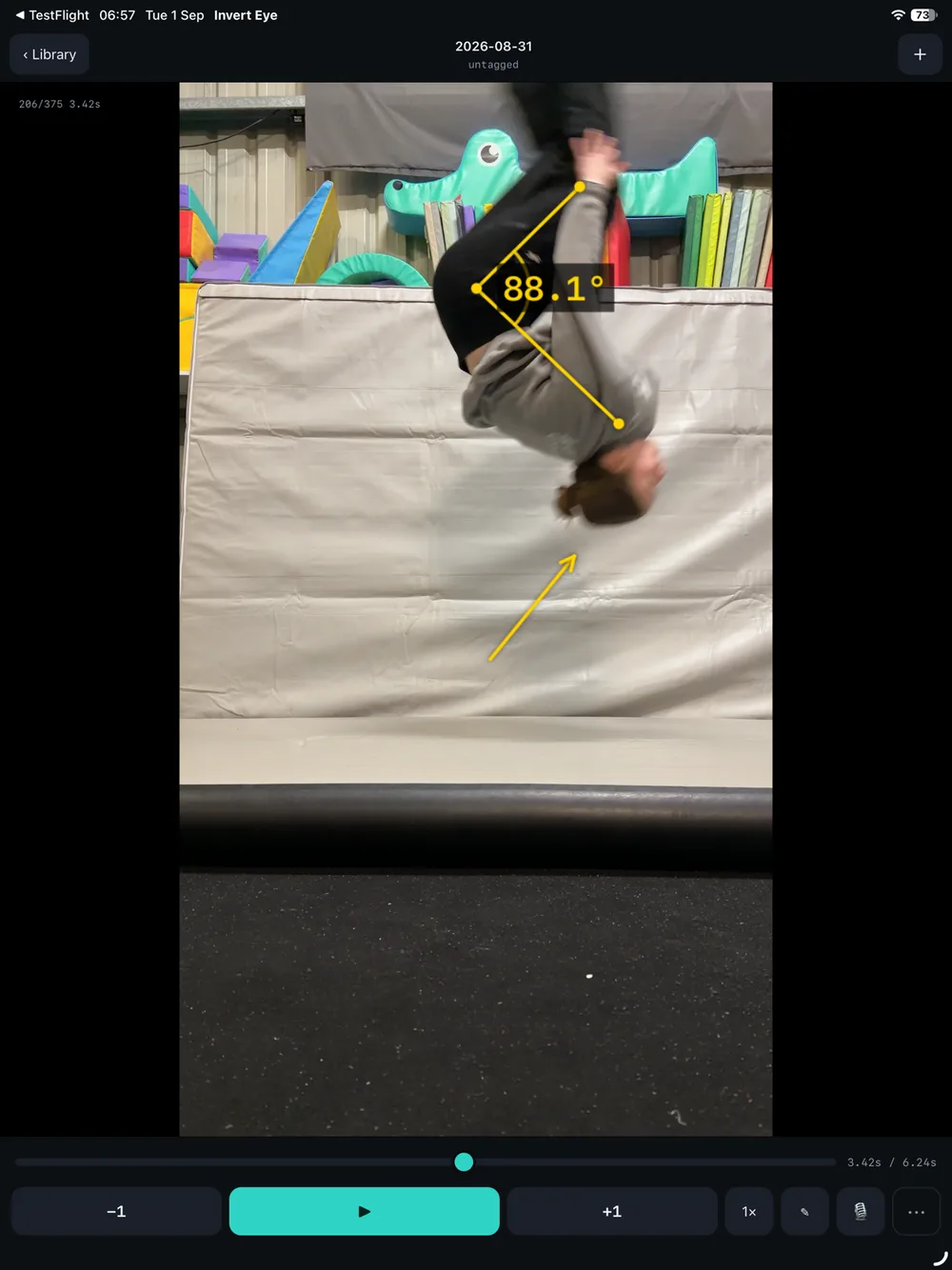
Invert Eye on iPad: a handstand paused mid-skill with an angle drawn over the shoulder reading 88.1 degrees, and playback controls below.
What it does

Built for the moment after the routine.

Frame-exact playback

Step and scrub frame by frame, or slow it right down, to see exactly where a skill goes wrong.

Draw on the video

Angles with live degrees, lines, arrows and reference lines, right on top of the footage.

Compare two attempts

Side by side, or ghost one clip over another to see the difference at a glance.

Voice-over feedback

Record your explanation over the clip and export it, drawings included, as a video to share.

Film in the app

Record straight into Invert Eye, ready to review on the spot.

Footage stays on the device

Videos stay in the photo library of the iPhone or iPad that filmed them. Nothing is uploaded.

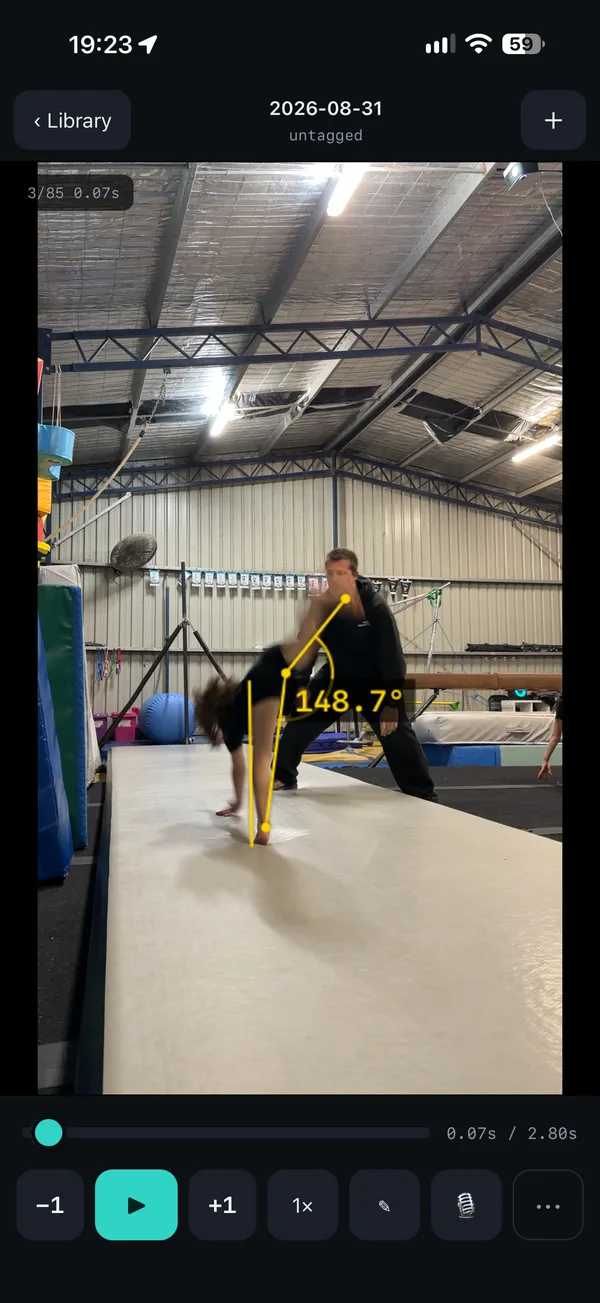
Invert Eye on iPhone: a gymnast on beam with an angle drawn at the hip reading 148.7 degrees.
Angles measured live on the frame.
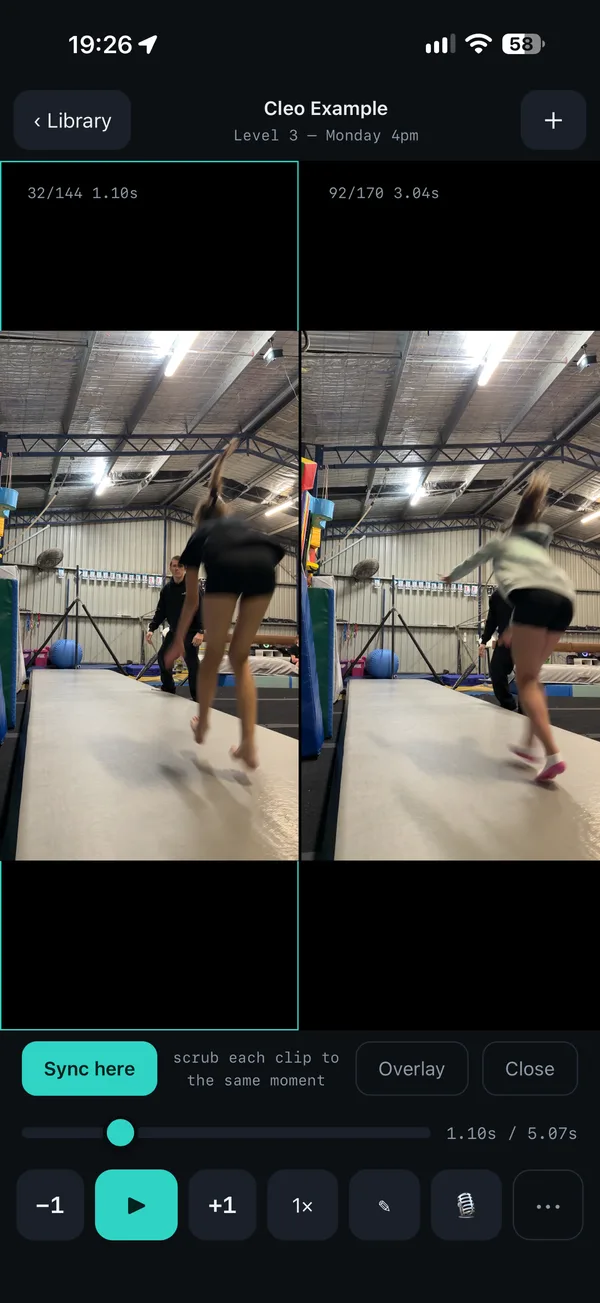
Invert Eye on iPhone comparing two attempts side by side, with a button to sync both clips to the same moment.
Two attempts side by side, synced to the same moment.

All of this is in the free app. It keeps nothing once you close it, and it doesn’t know your gymnasts. That’s what the club plan adds.

For clubs

Free for every coach. A record for the club.

Clips are kept

On a club device, every clip and its markings are still there next session, ready to pick up where you left off.

Filed against your gymnasts

Tag a clip to a gymnast from your club’s roster in Invert Core. Search by gymnast, class or clip, or see one gymnast’s clips together.

Video consent, enforced

Each family’s video consent is checked before a clip is tagged. A parent’s “no” can’t be overridden, and if the answer isn’t known, the app says no.

Every coach, one price

One club code sets up every phone and iPad your coaches use. There’s no charge per coach.

The club stays in control

If a phone is lost or a coach leaves, we cut that device off. It loses the roster and consent records, and the club’s tagged clips go with them.

Still nothing uploaded

The videos stay on the device that filmed them. Only each clip’s details (whose skill it is, its name and the drawings) are kept, in Australia.

Pricing

Free to use. One price to keep it.

Invert Eye

Film, step through, draw, compare, talk over and export. Nothing is kept between sessions, and gymnasts can’t be named.

Free

Invert Eye for clubs

Everything in the free app, kept and filed against your gymnasts, with video consent enforced. Every coach and every device. 14 days free, once per club.

A$20 /month

Prices include GST. The club’s owner pays by card in its Core account, under Club → Plan; already on Core? Choose Invert Eye there. Once your club has it, we’ll send you your club’s code, and each coach enters it once in the app. GCA member club? A$13 a month: use the GCA code when you sign up, or email vaughn@invertsystems.com.au if you’ve already signed up.

All four together? Rotation Scheduler, ChalkScore, Invert Eye and GymBux as one subscription: A$58 a month, or A$45 a month for the first ten clubs, kept for as long as the club stays subscribed (GCA members A$38, or A$29 for the first ten). Choose it in Core after you sign up.

Questions

Before you ask.

Is the free app really free?

Yes. No account, no ads, no in-app purchases and no tracking. It just doesn’t keep anything between sessions.

Where does the video go?

Nowhere. It stays in the photo library of the iPhone or iPad that filmed it, like any other video. Invert Eye keeps a pointer to it, never a copy.

Can coaches use their own phones?

Yes. The footage sits in their camera roll under your club’s own policies. If a coach leaves, we cut their phone off and the club’s records go with it.

Can coaches see each other’s clips?

Not yet. Each clip stays on the phone or iPad that filmed it, so a coach sees the clips they filmed.

What if a parent has said no to video?

The app won’t tag that gymnast, and nobody at the club can override it. If the app can’t tell what the family said, it refuses anyway.

Can it do slow motion?

Film in Slo-Mo with the Camera app and add the clip to Invert Eye, then step through it frame by frame. Playback speed works on any clip.

Does it work on Android?

No, iPhone and iPad only.

Where do we pay?

In your club’s Core account, under Club → Plan. The receipts and invoices are kept there too.
More: Support · App privacy policy